
emenu
Featureschevron_rightMenu informationchevron_rightMenu Health
monitor_heartFree

Menu Health

A 0–100 score that tells you what will improve your menu.

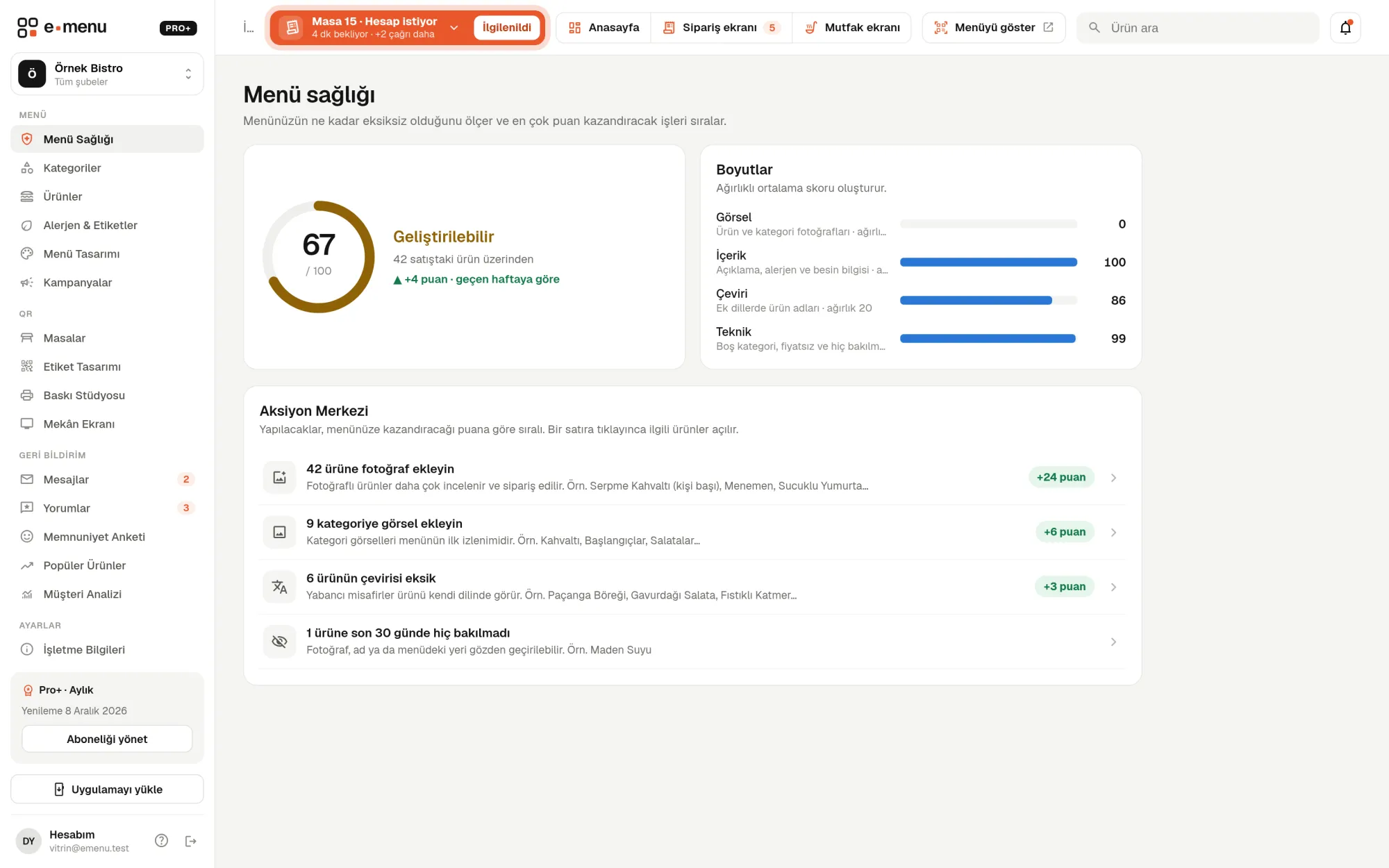
Menu Health · emenu panel screen
Overview

What is Menu Health?

Menu Health examines your digital menu from four angles and gives a score between 0 and 100: visuals, content, translation and technical gaps. 80 and above shows as Good, 55–79 as Needs work, and below 55 as Weak.

In a menu with hundreds of products, it’s hard to find which ones are missing photos or descriptions one by one. Menu Health counts these gaps for you and turns them into a task list in the Action Center. You don’t have to think about where to start; you begin with the first task on the list.

The calculation is based on products visible on the menu. Your score is compared with your score a week earlier, so you can see the effect of your changes.

What you can do

Menu Health ile

check_circle0–100 score: Good, Needs work or Weak
check_circleVisuals (30): product and category photos
check_circleContent (30): descriptions, allergens and calories
check_circleTranslation (20): missing translations
check_circleTechnical (20): empty categories, zero-priced products, never-viewed products
check_circleThe Action Center ranks tasks by the points they will earn
check_circleEach task shows the number of incomplete products, examples and a one-click link to the right screen
How it works

Three steps.

01
See your Menu Health score in the panel.
02
Pick the task that earns the most points in the Action Center.
03
Go to the right screen with one click and fill in the gap.
Details

Menu Health: details

Four dimensions, 100 points in total

Each dimension has a different weight. Dimension scores are combined according to their weights into a single score.

  • checkVisuals (30): product photos and category images
  • checkContent (30): product descriptions that are empty or shorter than 15 characters; on Pro, allergen, label and calorie information also count
  • checkTranslation (20): if extra languages are on, products whose names aren’t translated into every language
  • checkTechnical (20): empty categories, products priced at 0, products no guest viewed in the last 30 days

A fair score for your menu

If your menu has only one language, the translation dimension isn’t counted and its 20-point weight is spread across the others. So a café with a Turkish-only menu doesn’t lose points for not translating. Products priced by size aren’t counted as zero-priced. The “never-viewed product” check only kicks in when there have been enough visits in the last 30 days, to avoid false alerts on menus with little traffic.

Action Center: 8 task types

The Action Center turns gaps into tasks and ranks each task by the points it will earn once done. Each task shows how many products are affected, up to five sample product names, and why the task matters.

  • checkAdd photos to products
  • checkAdd images to categories
  • checkWrite product descriptions
  • checkComplete allergen, tag or calorie information
  • checkComplete missing translations
  • checkAdd products to empty categories or hide them
  • checkFix products priced at 0
  • checkReview products that were never viewed

The right screen in one click

Clicking a task opens the relevant screen. For photo, description, allergen and price tasks, the product list opens showing only products with that gap. The translation task takes you to the auto-translation screen, and the empty category task to the categories screen. When you fill the gap and come back, your score is recalculated.

In the panel Menu Health1 screens
Menu Health · emenu panel screen
Use cases

Who uses it, and how?

01

Café setting up its menu for the first time

The café imports its products via Excel but leaves photos for later. Menu Health shows a low visuals score; the Action Center puts “add photos to products” first and opens all products without photos in one list.

02

Restaurant hosting foreign guests

The restaurant has added English and German to its menu. Translations for newly added products get forgotten; Menu Health counts them and takes you to the auto-translation screen in one click.

03

Restaurant with a long menu

In a restaurant with more than a hundred products, some go unviewed for months. Menu Health lists them, and the business reviews their photo, name or place on the menu.

04

Owner who has the team edit the menu

The manager handles product entry, and once a week the owner checks the Menu Health score and its change since last week. They see what’s missing without checking product by product.

Frequently asked questions

Menu Health : questions

All plans, including Free. On Pro and Pro+, allergen information and translations also count toward the score.

Related features

inventory_2
Product and menu management
Add hundreds of products in minutes and update prices in bulk.
Free
monitoring
Analytics
See what guests do on your menu.
Pro
translate
Multiple languages and auto-translation
Translate your menu into any language with one click, and review before applying.
Pro
Free · no card needed

On the Free plan, for life.

Start freeCompare plans