
emenu
Featureschevron_rightMenu informationchevron_rightAllergens and tags
eggPro

Allergens and tags

Mark the 14 standard allergens; guests can filter by “does not contain”.

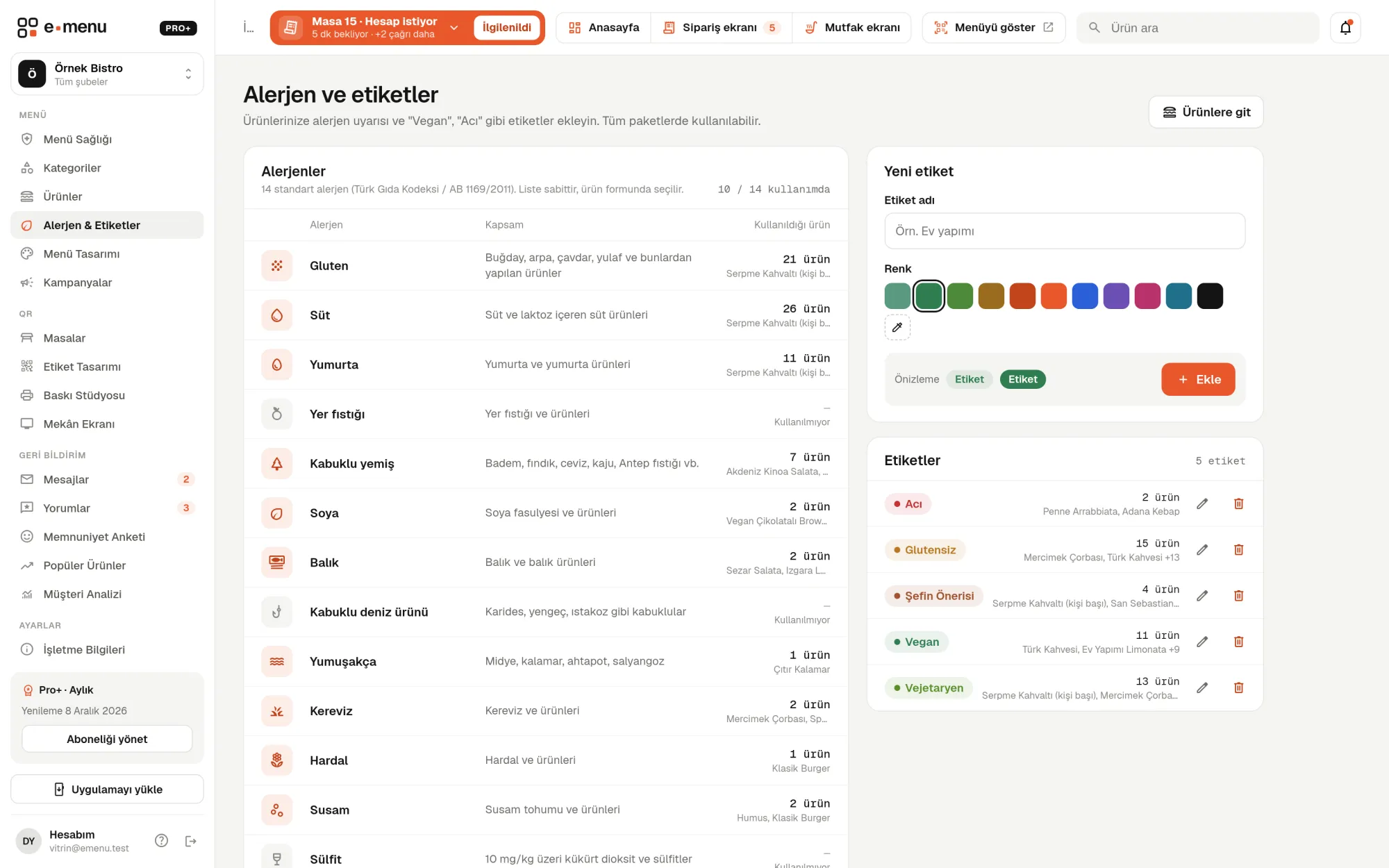
Allergens and tags · emenu panel screen
lockThis feature is in ProOn the Free plan? Upgrade, or try it free for 14 days with no card.See plans
Overview

What are allergens and tags?

Allergens and tags let you add the allergens each product contains, tags like vegan or spicy, and calorie information to every product on your digital menu. The allergen list is made up of the 14 standard allergens listed in the Turkish Food Codex and EU regulations. This information appears on the guest’s phone, right next to the product.

With a printed menu, guests with food allergies often have to ask the waiter what’s in a dish. The waiter goes to the kitchen, service slows down, and there’s a risk of wrong information. When the allergen list is ready on the QR menu, guests find suitable products themselves, and your team doesn’t answer the same question at every table.

On the menu, a guest picks, say, gluten and milk in the “Does not contain” filter, and products with those allergens drop out of the list. They can also filter by tags, for example to see only vegan products.

What you can do

Allergens and tags ile

check_circleGluten, milk, eggs, peanuts, tree nuts, soy, fish
check_circleCrustaceans, molluscs, celery, mustard, sesame, sulphites, lupin
check_circleTags such as vegan, vegetarian, gluten-free and spicy
check_circleCalories and nutrition facts (fat, carbohydrates, protein)
check_circleGuests search the menu with a “does not contain” filter
How it works

Three steps.

01
Add allergens and tags to your products.
02
Enter calories and nutrition facts.
03
Guests use the filter to find what suits them.
Details

Allergens and tags: details

14 standard allergens

The allergen list is fixed and the same for every business. You just tick the relevant allergens on the product form. In the panel you see on one screen how many products use each allergen and which ones.

  • checkGluten, milk, eggs, peanuts
  • checkTree nuts (such as almonds, hazelnuts, walnuts, cashews), soy, fish
  • checkCrustaceans (shrimp, crab), molluscs (mussels, squid, octopus)
  • checkCelery, mustard, sesame, sulphites, lupin

Your own tags: vegan, vegetarian, gluten-free, spicy

You create the tags yourself: type a name and pick a color, such as “Vegan”, “Vegetarian”, “Gluten-free”, “Spicy” or “Homemade”. A tag appears as a colored badge in the product list and product details. When you change a tag’s name or color, it changes on every product that uses it.

Calories and nutrition facts

You can enter calories, fat, carbohydrates and protein for each product, and choose the basis the values refer to. Calories appear next to the price in the product list; the nutrition table appears in product details. Values you leave empty aren’t shown on the menu.

  • checkPer serving
  • checkPer 100 g or 100 ml
  • checkPer glass, cup or bottle

“Does not contain” filter for guests

Guests pick the allergens they want to avoid in the filter panel; their choices appear at the top of the menu as short chips like “No gluten” and are removed with one tap. Tapping tag chips lists only vegan or gluten-free products. Allergen names are shown in Turkish, English, German, Russian or Arabic, depending on the menu’s interface language.

Bulk entry via Excel and printed materials

When importing products via Excel or CSV, you can fill in the allergen column too; just separate allergen names with commas. In Print Studio, allergen information can be added to the printed menu, and buffet item cards always list allergens. Menu Health also counts and lists products missing allergen, tag or calorie information.

In the panel Allergens and tags2 screens
Allergens and tags · emenu panel screen
Use cases

Who uses it, and how?

01

Restaurant in a tourist area

Instead of asking the waiter about ingredients, a foreign guest opens the menu and selects tree nuts and sesame in the filter. Since allergen names change with the menu’s interface language, the language barrier disappears here.

02

Café with vegan and gluten-free options

The café creates “Vegan” and “Gluten-free” tags in its own colors. Guests tap a tag on the menu and see only those products, with no need to search a long list one by one.

03

Patisseries and dessert shops

Hazelnuts, milk, eggs and gluten are in almost every product. The patisserie marks each product’s allergens once, and QR product cards in the display case point guests to each item’s allergens and nutrition facts.

04

Hotel restaurants and buffets

At the buffet, a QR card sits in front of each dish. Guests who scan it see the dish’s ingredients, allergens and nutrition facts on a price-free buffet page.

Frequently asked questions

Allergens and tags : questions

Pro and Pro+. On the Free plan, allergens, tags and nutrition facts aren’t shown on the menu. You can use them with the free trial before upgrading to a paid plan.

Related features

translate
Multiple languages and auto-translation
Translate your menu into any language with one click, and review before applying.
Pro
inventory_2
Product and menu management
Add hundreds of products in minutes and update prices in bulk.
Free
monitor_heart
Menu Health
A 0–100 score that tells you what will improve your menu.
Free
Pro · 99 ₺ / month + VAT

Grow your menu with Pro.

Try free for 14 daysCompare plans