
emenu
Featureschevron_rightGuest relationschevron_rightContact messages
forumPro

Contact messages

Guests write to you directly from the menu via the “Write to us” form.

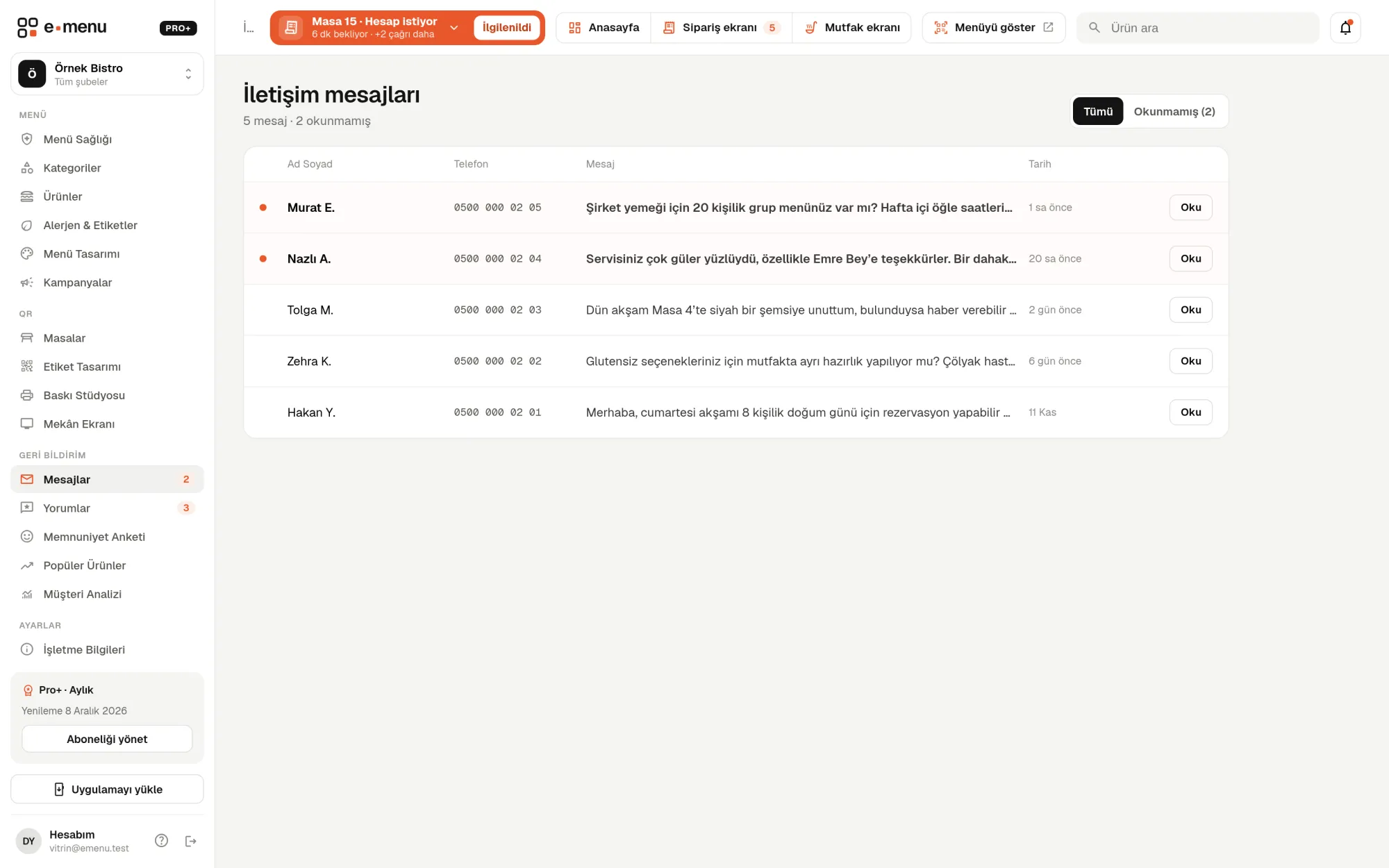
Contact messages · emenu panel screen
lockThis feature is in ProOn the Free plan? Upgrade, or try it free for 14 days with no card.See plans
Overview

What are contact messages on the QR menu?

Contact messages are a “Write to us” form guests can use to write to you directly from the QR menu. Guests enter their name, phone and message, and it lands on the Contact messages page in your panel. No app download, searching for an email address or messaging on social media needed.

When something goes wrong at the table, most guests don’t tell the waiter; they either stay quiet or post online later. This form inside the digital menu brings their words to you first. It collects complaints, suggestions and group dining questions in one place, and you call the guest back.

On the Pro and Pro+ plans, the form appears automatically on the menu’s Contact page. The tab in the menu’s bottom bar is then named “Contact”.

What you can do

Contact messages ile

check_circle“Write to us” form on the menu
check_circleMessages reach the business directly
check_circleMessages update in the panel in real time
How it works

Three steps.

01
Enable the form on your menu.
02
Guests write their message.
03
Read the message in the panel.
Details

Contact messages: details

How do guests see the form?

The form sits on the online menu’s Contact page, below the address, map, opening hours and Wi-Fi details. It uses your menu design’s colors and font; buttons and alerts appear in the guest’s chosen interface language (Turkish, English, German, Russian or Arabic).

  • checkFull name
  • checkPhone: 11 digits starting with 05
  • checkMessage: at least 10, at most 2,000 characters
  • checkConsent checkbox for sharing the phone number with the business
  • check“Your message has been sent” confirmation after submitting

Messages in the panel: read, unread, call

Every incoming message is listed on the Contact messages page. Unread messages are highlighted; the side menu counter, the notification bell in the top bar and the message card on the panel home page announce new messages. While the page is open, the list refreshes itself.

  • checkAll and Unread tabs
  • checkOpening a message marks it as read
  • checkYou can mark it “unread” again if you like
  • checkCall the guest’s number with one tap
  • checkDelete unwanted messages

Who sees the messages?

Messages are seen by the owner and staff with the Manager role. The Waiter and Kitchen roles can’t access this page. That way the guest’s phone number stays only with authorized people.

Protection against spam and abuse

The form uses a hidden field that filters out bots sending automated submissions and limits many submissions in a short time. Since a phone number is required, there’s a reachable person behind every message; guests explicitly consent to sharing their number on the form.

In the panel Contact messages1 screens
Contact messages · emenu panel screen
Use cases

Who uses it, and how?

01

Restaurant with busy evenings

On a Saturday night with waiters rushing around, a guest writes from the menu that their food arrived cold. The manager sees the message in the panel, calls the guest and gets the chance to fix the problem before the guest leaves.

02

Patisseries and special orders

A guest who wants information about a birthday cake or a group breakfast leaves their name and number on the form in the café menu. You get back to them once the rush is over.

03

Hotel restaurant

Foreign guests see the form interface in their own language and write their dietary request or dinner question from the menu. The message reaches the restaurant manager in the panel.

04

Café collecting feedback

A café renewing its menu adds a note to its table cards: “Send us your feedback from the menu.” Suggestions pile up in the unread tab and are discussed one by one at the team meeting.

Frequently asked questions

Contact messages : questions

Pro and Pro+. On the Free plan, the form doesn’t appear on the menu; you can use it during the free trial.

Related features

reviews
Product reviews
Guests write reviews; they go live once you approve them, and you can reply.
Pro
sentiment_satisfied
Satisfaction survey
Measure what your guests think, NPS included.
Pro
storefront
Venue information
Opening hours, directions and Wi-Fi password on your menu.
Pro
Pro · 99 ₺ / month + VAT

Grow your menu with Pro.

Try free for 14 daysCompare plans