
emenu
Featureschevron_rightMenu informationchevron_rightVenue information
storefrontPro

Venue information

Opening hours, directions and Wi-Fi password on your menu.

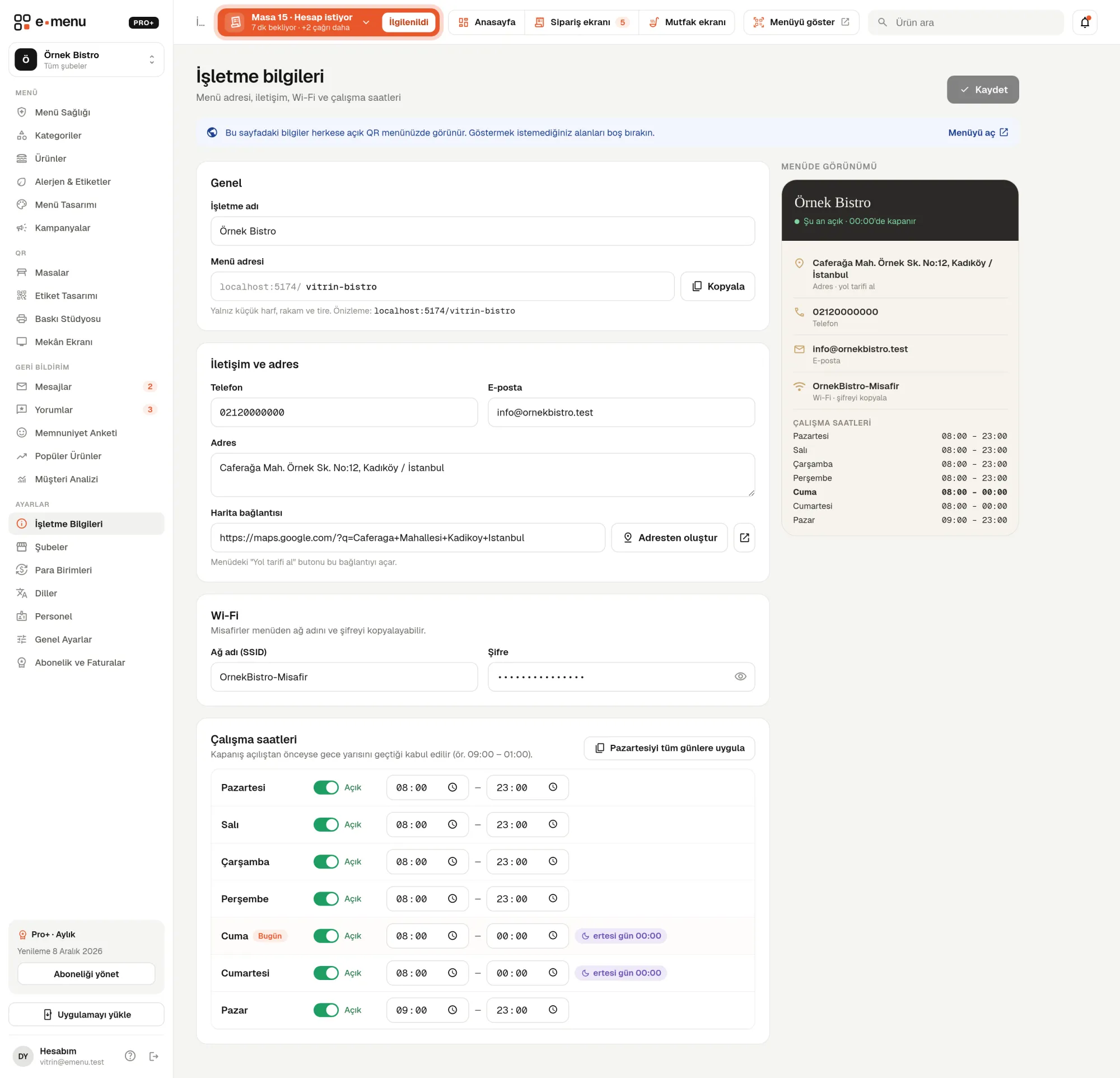
Venue information · emenu panel screen
lockThis feature is in ProOn the Free plan? Upgrade, or try it free for 14 days with no card.See plans
Overview

What is venue information?

Venue information puts the answers to guests’ most frequent questions on your QR menu: Are you open right now, how do I get there, what’s the Wi-Fi password? You enter your weekly opening hours, map link and Wi-Fi details in the panel once, and they appear on your menu right away.

At most venues, the Wi-Fi password is on a piece of paper behind the till or in the waiter’s head. And guests often find out about changed hours only when they reach the door. When this information lives on the online menu, it’s updated in one place and everyone sees the same, correct details.

Address, phone and email appear on the menu on every plan. Opening hours, map and Wi-Fi fields are in the Pro plan.

What you can do

Venue information ile

check_circleOpen/closed status on the menu
check_circleWeekly opening hours
check_circleMap and directions
check_circleWi-Fi password copied with one tap
How it works

Three steps.

01
Enter your opening hours.
02
Add your location and Wi-Fi details.
03
Guests see the information on your menu.
Details

Venue information: details

Weekly opening hours and open/closed status

You enter opening and closing times for each day or mark the day as closed. Based on the time on the guest’s phone, the menu shows a status like “Open · closes 23:00” or “Closed · opens 09:00”. All days of the week are listed, with today highlighted.

  • checkOpening and closing times day by day
  • checkClosed all day or open 24 hours options
  • checkHours past midnight (e.g. 18:00 – 02:00)
  • checkApply Monday’s hours to all days with one click

Map and directions

You paste your map link, or generate it automatically from your full address with “Create from address” in the panel. The “Directions” button on the menu opens this link. Guests who tap your phone number call you directly.

One-tap Wi-Fi password

You enter the network name (SSID, the wireless network name shown on the phone) and password. Guests who tap the Wi-Fi button on the menu see the network name and password and copy the password with one tap. The same details are used elsewhere too.

  • checkThe Wi-Fi card in Print Studio: phones that scan the QR join the network
  • checkThe QR and Wi-Fi slide on the Venue Screen
  • checkThe bottom of the 80 mm check in the Pro+ plan

Where does the information appear on the menu?

Depending on your menu design, the hours and Wi-Fi card appear on the menu’s home page. The contact page brings together the address, map, directions, phone and weekly hours table. If you use My own design, you place the “Venue information” block wherever you like. Just leave empty any field you don’t want to show.

Menu address and contact details

On the same screen you also edit your venue name, address, phone, email and menu address. If you change the menu address, your printed QR codes will point to the old address; the panel reminds you of this before saving.

In the panel Venue information1 screens
Venue information · emenu panel screen
Use cases

Who uses it, and how?

01

Café where guests stay for hours

Guests arriving with a laptop ask for the Wi-Fi password first. The café adds the password to the menu; guests scan the QR and copy it, and the waiter doesn’t have to deal with the question.

02

Seasonal beachfront venue

Hours change at the start and end of the season. The venue enters the new hours in the panel; the QR menu updates instantly, with no need to reprint the sign on the door or the printed menu.

03

Bar open late into the night

The bar opens at 18:00 and closes at 02:00. Hours past midnight are calculated correctly; a guest looking at the menu at 01:00 sees the “Open” status.

04

Hotel restaurant

Hotel guests check from their room whether the restaurant is open. The Wi-Fi details also flow automatically into the Wi-Fi cards prepared in Print Studio.

Frequently asked questions

Venue information : questions

Opening hours, map/directions and Wi-Fi are in Pro and Pro+. Address, phone and email appear on the menu on the Free plan too.

Related features

qr_code_2
QR menu
Guests scan the QR and the menu opens on their phone, no app download needed.
Free
print
Print Studio
Printed menu, buffet card, Wi-Fi card and stickers, all from your menu. Table QR labels in every plan.
Pro
account_tree
Multiple branches
All your branches from one account.
Pro
Pro · 99 ₺ / month + VAT

Grow your menu with Pro.

Try free for 14 daysCompare plans