
emenu
Featureschevron_rightGrowth and analyticschevron_rightStaff accounts
badgePro

Staff accounts

Invite your team, and everyone sees only their own work.

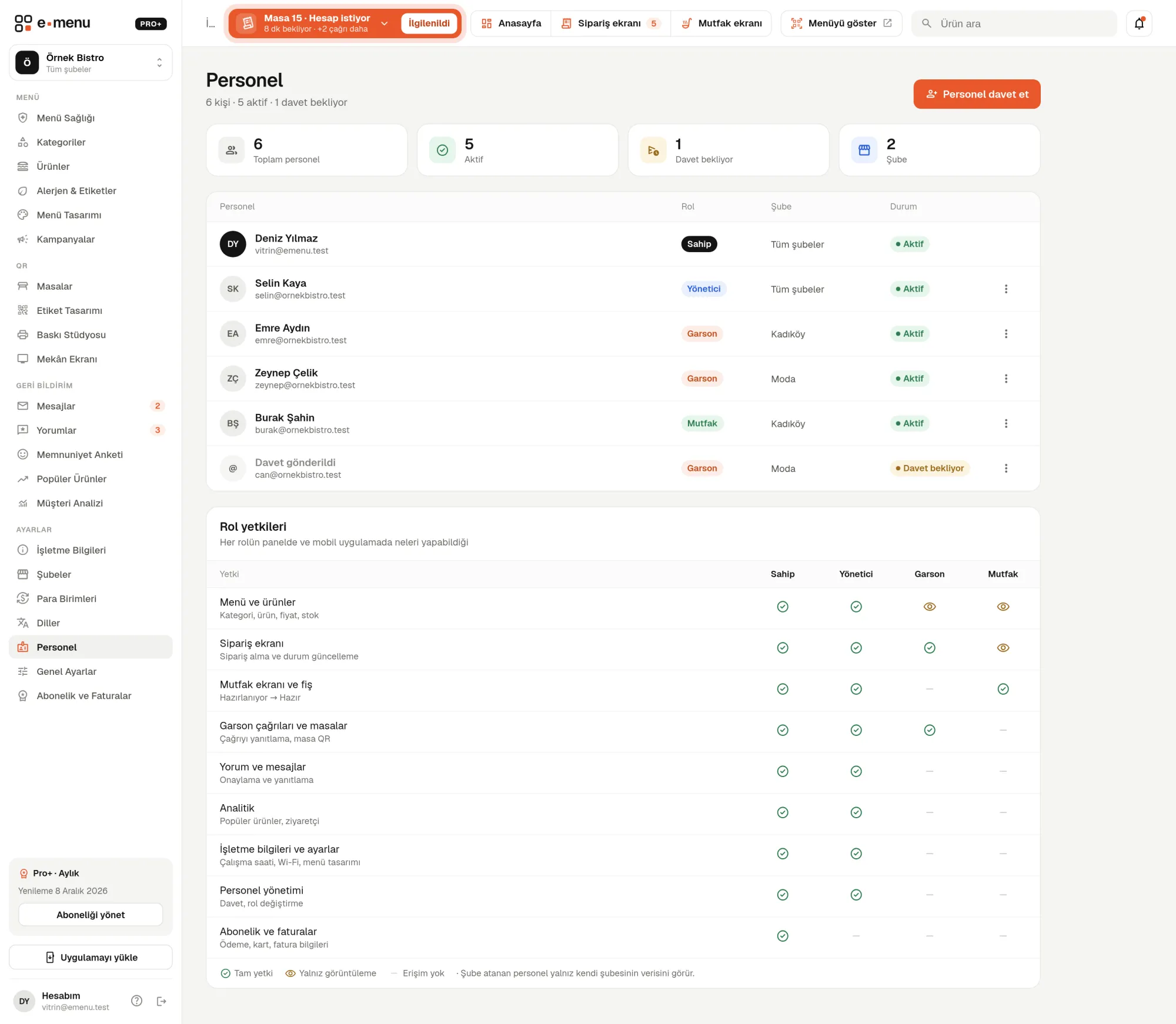
Staff accounts · emenu panel screen
lockThis feature is in ProOn the Free plan? Upgrade, or try it free for 14 days with no card.See plans
Overview

What are staff accounts?

Staff accounts let each person on your team log in to the emenu panel with their own email and password. You give everyone a role, and the role determines what they can see and change. A waiter can’t change menu prices, and the kitchen can’t see your subscription details.

Sharing one password with the whole team is unsafe and makes it unclear who did what. With separate accounts, you shut off a departing employee’s access with one click, without changing your own password.

Staff accounts are available in Pro and Pro+. On Pro+, waiters and managers also log in to the emenu Business mobile app with the same accounts.

What you can do

Staff accounts ile

check_circleStaff are invited by email
check_circleOwner, Manager, Waiter and Kitchen roles
check_circleRole-based permissions
check_circleStaff assigned to a branch only see their own branch
How it works

Three steps.

01
Invite your staff by email.
02
Choose their role and branch.
03
Staff log in with their own accounts.
Details

Staff accounts: details

Four roles, clear permissions

You choose a role when inviting staff and can change it later. The Staff page has a permissions table showing what each role can do in the panel and the mobile app.

  • checkOwner: everything, including subscription, payments and invoices
  • checkManager: menu, orders, reviews and messages, analytics, business settings and staff; excluding the subscription
  • checkWaiter: order screen, tables and waiter calls; can only view the menu
  • checkKitchen: kitchen display and ticket printing; can only view orders

Invite by email

You enter the staff member’s email address and choose their role and branch. They join the team by setting their name and password via the link in the email; if they already have an emenu account, they confirm with their password. The invitation link is valid for 7 days.

  • checkPending invitations appear separately in the list
  • checkResend an expired invitation
  • checkCancel an invitation that hasn’t been accepted

Branch-based permissions

In a multi-branch restaurant, you assign staff to a single branch or all branches. Staff assigned to a branch see only their own branch’s tables, orders and data, and can’t switch to another branch.

You control access

Staff accounts are under your control. You can temporarily suspend someone, remove them from the team or turn off all staff logins.

  • checkDeactivation: the account is paused and the staff member can’t log in; you reactivate it whenever you like
  • checkRemove staff from the team
  • checkTurn off all staff logins with a single switch in general settings
  • checkA 6-digit verification code by email when logging in from a new device

Which role is useful on which plan?

On the Pro plan, the Manager role manages the menu, reviews, messages and analytics; the Waiter role follows tables and waiter calls. Since table ordering, the order screen and the kitchen display are in Pro+, the Kitchen role and the waiter’s order tasks really come into their own with Pro+.

In the panel Staff accounts2 screens
Staff accounts · emenu panel screen
Use cases

Who uses it, and how?

01

Café whose owner isn’t there every day

The café owner leaves daily work to the manager. The manager handles the menu, prices and reviews with the Manager role; the subscription and invoices stay with the owner only.

02

Restaurant taking orders from the table

At a restaurant on Pro+, waiters follow the order screen and calls with the Waiter role, and the kitchen team sees only the kitchen display with the Kitchen role. Menu settings and guest messages don’t open on the kitchen tablet.

03

Business with two branches

Each branch manager is assigned to their own branch. The owner sees all branches; a branch manager sees only their own branch’s tables and orders.

04

Beach restaurant with seasonal staff

Extra waiters for the summer season are added by invitation, and their accounts are deactivated when the season ends. When the same people return the next summer, their accounts are reactivated.

Frequently asked questions

Staff accounts : questions

Pro and Pro+. Since the kitchen display and table ordering are in Pro+, the Kitchen role is most useful with Pro+.

Related features

account_tree
Multiple branches
All your branches from one account.
Pro
smartphone
Mobile app
emenu Business: the check in your waiter’s pocket. On Android and iOS, included in Pro+.
Pro+
soup_kitchen
Kitchen display
Orders appear full screen in the kitchen, on 3-column cards.
Pro+
Pro · 99 ₺ / month + VAT

Grow your menu with Pro.

Try free for 14 daysCompare plans