
emenu
Featureschevron_rightOrdering and servicechevron_rightWaiter calls
notifications_activePro

Waiter calls

Guests call a waiter or ask for the bill from the table with one tap.

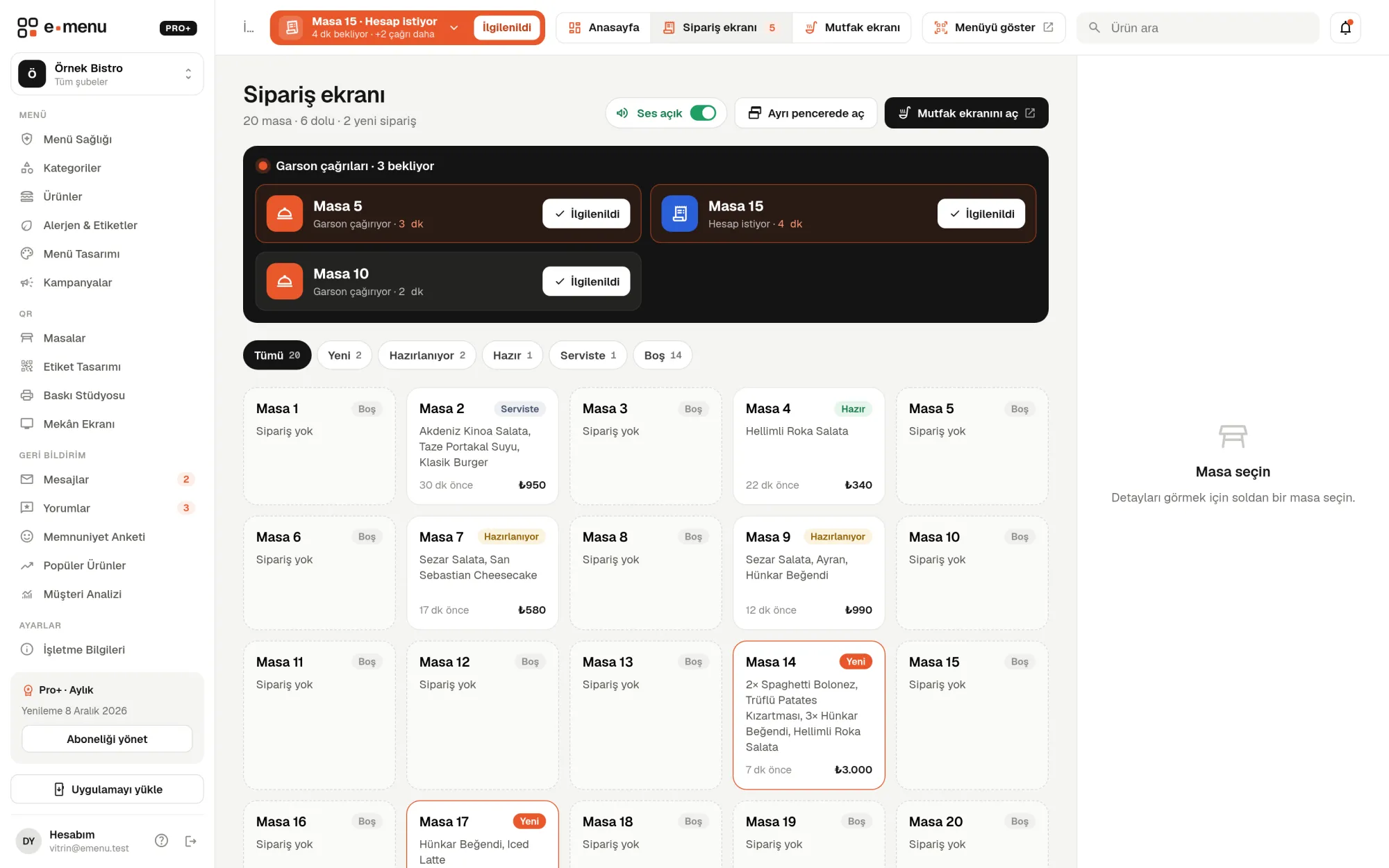
Waiter calls · emenu panel screen
lockThis feature is in ProOn the Free plan? Upgrade, or try it free for 14 days with no card.See plans
Overview

What is waiter calling?

Waiter calling lets guests call staff from the QR menu on the table. The menu has two buttons: “Call waiter” and “Ask for the bill”. When a guest taps one, the call lands in your panel along with the table name.

At busy times, guests raising their hands and waiting for a waiter wears out both guests and staff. Buying a separate bell or wireless button device for each table also means extra cost, plus batteries and maintenance. In emenu, the call waiter button is already inside the QR menu on the table; no extra hardware needed.

The feature is in the Pro plan. Each table uses its own QR so you know which table the call came from; if you use a single general QR for all tables, waiter calling stays off.

What you can do

Waiter calls ile

check_circleWaiter calls and bill requests
check_circleCalls arrive in the panel instantly with the table number
check_circleThe guest sees “Your waiter has responded”
check_circleOn Pro+, calls are taken and completed in the mobile app
How it works

Three steps.

01
Place your table QR codes.
02
Guests send a call from the menu.
03
Respond to the call from the panel.
Details

Waiter calls: details

On the guest’s side

When guests open the menu from the table QR, they see the call waiter button. After making their choice, they follow the call’s status on their phone. The buttons appear in the menu’s interface language (Turkish, English, German, Russian or Arabic).

  • check“Call waiter”: for an order, a question or a request
  • check“Ask for the bill”: to have the bill brought to the table
  • checkAfter calling, a “Your waiter is on the way” or “Your bill is being prepared” notice
  • checkA “Your waiter has responded” notice once staff take care of it
  • checkGuests can cancel the call or call again

Calls in the panel

When there’s an open call, an orange banner appears in the top bar on every page of the panel: table name, call type and how long it has been waiting. Pressing “Handled” closes the call and updates the guest’s screen. If a second call of the same type comes from the same table, no new entry is created; the existing call stays active.

  • checkSound alert on new calls
  • checkNumber of pending calls in the browser tab title
  • checkDrop-down list when there are several calls
  • checkRecent calls in the notification bell
  • checkOn Pro+, a separate call area on the order screen; calls waiting over 3 minutes are highlighted

In the mobile app with Pro+

On the Pro+ plan, calls also arrive as push notifications in the emenu Business app for Android and iOS. Notifications go to waiters and managers on shift at that branch. A waiter takes the call with “Take it”, and the others see who took it; when done, they complete the call.

On/off, tables and staff

With the switch on the Tables page, you turn waiter calling off and on whenever you like. Tables are numbered automatically from 1 to 300, and each table gets its own QR. In staff accounts, the waiter role sees orders and calls; staff assigned to a branch see only their own branch’s calls.

In the panel Waiter calls2 screens
Waiter calls · emenu panel screen
Use cases

Who uses it, and how?

01

Café with a large garden

It’s hard for the waiter to see every table in the garden. A guest sends a call from the menu, and a “Table 14 · Calling waiter” banner appears on the screen at the till with a sound alert. The waiter goes to the table and presses “Handled”.

02

Quick lunch break meal

A guest on a lunch break taps “Ask for the bill”. The waiter prepares the bill and brings it to the table; payment is made to the waiter at the table.

03

Hotel restaurant and pool bar

Foreign guests call a waiter without needing the language. When the menu interface opens in English, German, Russian or Arabic, the buttons appear in that language too; the call reaches the panel in Turkish with the table name.

04

Restaurant with a waiter team (Pro+)

The call arrives as a notification on the phones of waiters on shift. The first waiter to press “Take it” goes to the table; the others see the call has been taken, so no second person goes to the same table.

Frequently asked questions

Waiter calls : questions

The Pro plan, and Pro+ as well. On Pro+, calls also arrive as push notifications in the emenu Business mobile app.

Related features

room_service
Table ordering
Guests order from the table and track the status on their phone.
Pro+
smartphone
Mobile app
emenu Business: the check in your waiter’s pocket. On Android and iOS, included in Pro+.
Pro+
badge
Staff accounts
Invite your team, and everyone sees only their own work.
Pro
Pro · 99 ₺ / month + VAT

Grow your menu with Pro.

Try free for 14 daysCompare plans